
Salesforce makes it incredibly easy to upgrade your plan, add more seats, or talk to a sales rep. If you want to cancel your account and stop auto-renewal, the process gets vague and annoying. It’s buried in menus and requires more manual steps.
This is what I found when trying to cancel.
A Product Built for Upsell, Not Off‑Ramp
Log into Salesforce and you’ll immediately see:
- Prominent options to upgrade or add products
- Clear paths to talk to Sales
- In‑product prompts to expand usage or licenses
What you won’t see is anything like a straightforward:
“Manage subscription” → “Cancel account”
Instead, the UI is heavily optimized for expansion, not exit. If you’re used to consumer SaaS, canceling in two clicks, Salesforce will seem outdated. Here, you can only exit by going through a human gatekeeper.
Support Is Easy… If You Want to Buy More
If you want to talk to a real person, Salesforce is very happy to help — as long as it’s about buying.
- Sales team: very visible and easy to reach
- Revenue-facing contact paths: prominent phone numbers, forms, and CTAs
- Cancellation contact: essentially hidden behind layers of help content and indirect routing
When you need billing or cancellation help, you quickly discover that:
- The Help Center focuses on how to use Salesforce as an active CRM user (how to manage users, data, settings, etc.)
- The documentation about ending your commercial relationship is often vague. It can be incomplete or assume your account is active. It also might suggest you’re just removing access for some users.
You’re left with the distinct impression that Salesforce is structurally designed to make it easier to expand than to leave.
The Help Center: Lots of Words, Not Much Exit
Search the Help or Knowledge Base for things like:
- “cancel account”
- “stop subscription”
- “turn off auto‑renew”
You’ll mostly find:
- Articles about removing users or deactivating licenses inside an active org
- Instructions for admins disabling access for individuals
- Policy descriptions rather than an actual, actionable cancellation flow
What you won’t easily find is a clean, official, self‑serve:
“Click here to cancel your org and disable auto‑renew.”
In practice, what most customers discover — usually after some trial and error — is that you don’t cancel inside the product at all.
You have to email them.
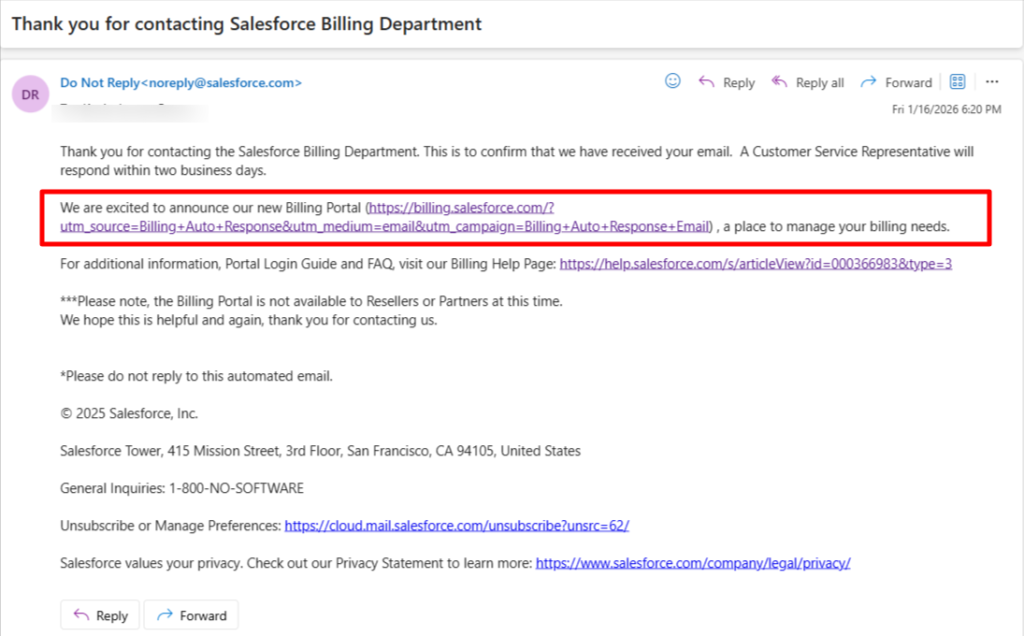
The Real Cancellation Flow: Email First, Link Later
Here’s what the practical, real‑world cancellation flow looks like:
- You track down a way to contact Salesforce Billing/Support by email. This often isn’t front and center. Many users end up replying to an old billing email or account notice just to reach a human.
- You explicitly request cancellation and auto‑renew shutdown. You usually have to spell out that you want:
- Your subscription cancelled at the end of the current term
- Auto‑renew turned off so you’re not silently rolled into another contract
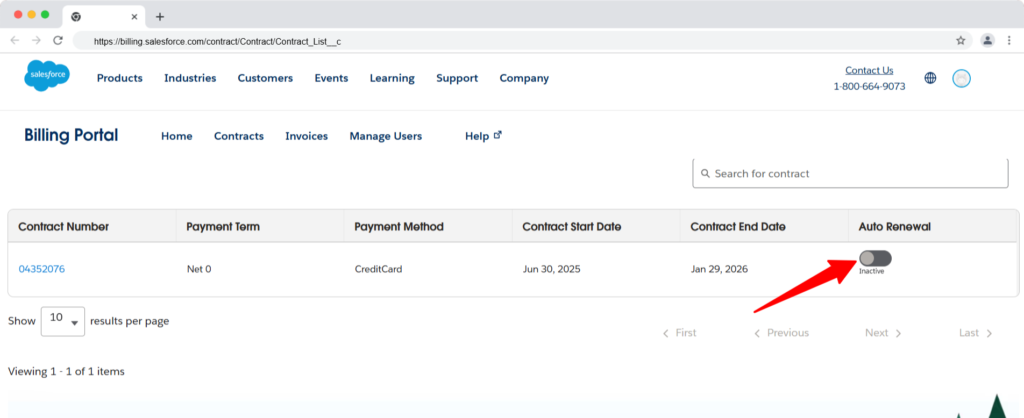
- They eventually send you a link or instructions. After some back‑and‑forth, Salesforce will send:
- A link to a page where you can disable auto‑renew and confirm cancellation or
- Written confirmation that they’ve processed the request on their end
- You confirm and wait. Cancellation often doesn’t take effect immediately if you’re mid‑contract; it’s usually at the end of the current term. You’ll want to:
- Screenshot the confirmation
- Save the email thread
- Set a reminder around your renewal date to verify you weren’t re‑billed
It’s a multi‑step, human‑mediated process for something that, in 2026, most SaaS platforms let you do from a billing page in seconds.
Why This Matters
Salesforce isn’t a $9/month app; it’s an enterprise platform that can lock you into expensive annual (or multi‑year) contracts. Hiding cancellation behind email and making the self‑serve path opaque creates several problems:
- Time cost: Admins and finance teams burn cycles trying to figure out a basic subscription action.
- Risk of unwanted renewal: If you miss your window, you can easily roll into another term before getting a response.
- Asymmetry: Upgrades are one click; cancellation is a multi‑day email chain.
For a company that talks a lot about customer success, the experience of simply leaving could be far more transparent and self‑serve.
What I’d Like to See from Salesforce
As a tech reviewer, here’s what a user‑respecting experience would look like:
- A clear “Manage Subscription” area inside the admin console
- A visible toggle for auto‑renew, with the next renewal date clearly shown
- A documented, self‑serve cancellation flow, spelled out in the Help Center, with screenshots
- Human support available for edge cases — not as a mandatory bottleneck for everyone who wants to cancel
Until then, cancelling Salesforce will feel old-fashioned. You’ll see plenty of options to buy more. But if you want to leave, there’s just a quiet, email-only way to do it.

We remove your personal information from 200+ broker sites, take back the first page of Google, and alert you the moment your data appears on the dark web.